




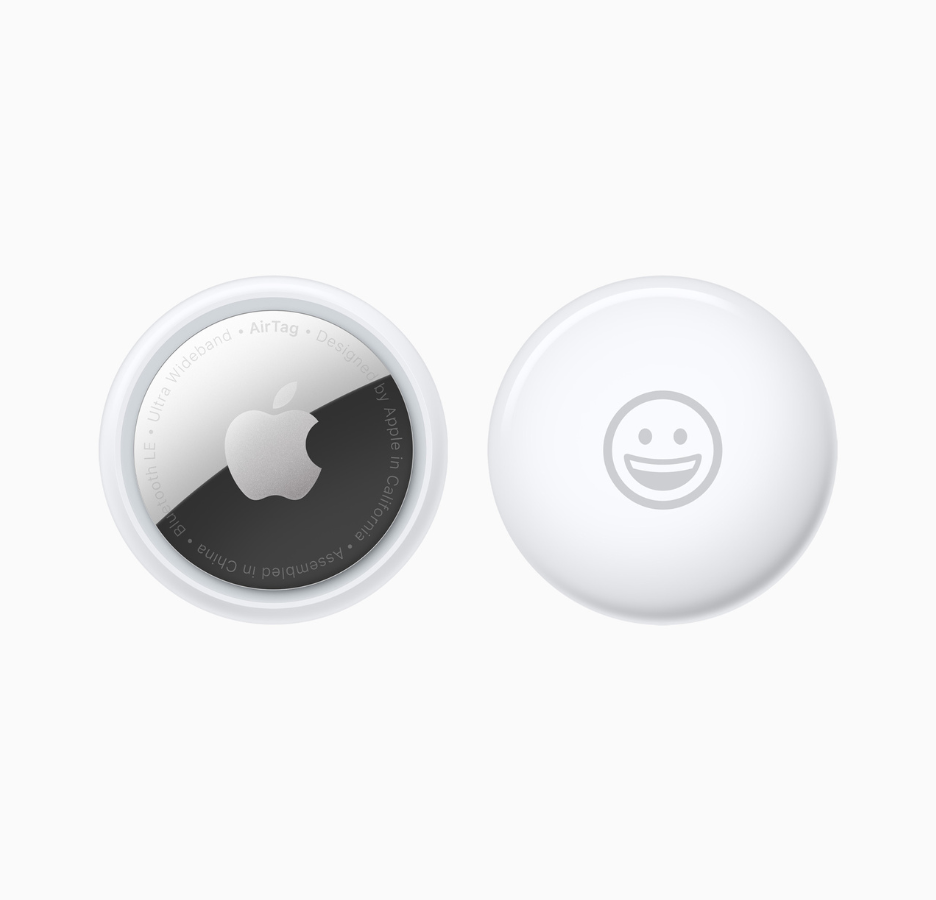
In an era defined by speed and constant movement, the need for reliable tools to track personal belongings has become essential. Launched in 2021, Apple’s AirTags quickly established themselves as the go-to solution. These small, affordable trackers, designed with a compact form factor, leverage the power of the Apple ecosystem to offer precise global tracking, expanding their usefulness from simply finding misplaced keys to full integration with airport logistics systems.
Apple AirTag: how it works and why it’s so effective
The effectiveness of AirTags lies in their ability to combine two key tracking technologies:
- The Find my network
The basic AirTag function relies on low-energy Bluetooth, which periodically sends out an encrypted ID. Millions of Apple devices (iPhone, iPad, Mac) around the world securely and anonymously detect this signal and relay its location to Apple’s servers.
This crowdsourced network turns every Apple user into a potential helper in locating a lost item, letting the owner view the AirTag’s last known location on a map—no matter how far away it is.
- Ultra Wideband (UWB) and precision finding
On more recent devices (iPhone 11 and later), AirTag uses UWB technology, which allows for extremely accurate positioning. The phone can guide the user step by step toward the object, showing directional arrows, precise distance estimates (e.g., “0.5 m to your left”), and providing haptic and audio feedback as you get closer.
The initial setup is intuitive, in true Apple style: simply bring the AirTag close to your iPhone or iPad to start the pairing process, assign a name (e.g., “Suitcase” or “Office Keys”), and link it to your Apple ID.
Apple AirTag: uses beyond convenience
Beyond helping you find things at home, AirTags have transformed the travel experience. Baggage tracking is the most popular use case, and Apple has recently enhanced this feature to work directly with airlines:
Airline API Integration
Building on the Share Item Location feature, Apple developed a new API that allows AirTag location data to flow directly into airline baggage-tracking systems.
The first airline to adopt this integration—after extensive testing in some of the world’s busiest airports—was Delta Air Lines.
Simplified recovery
This direct connection reduces manual steps for ground staff, making lost luggage recovery faster and more reliable. The user still needs to enable Share Item Location in the Find My app and provide the generated URL to the airline.
Prevention and sharing
To prevent loss in the first place, the Notify When Left Behind option alerts the user immediately if their AirTag becomes separated from their device.
Additionally, the AirTag Sharing feature (available since iOS 17) lets up to five people simultaneously track the same item—ideal for commonly used objects.
AirTag battery, range, price, and technical specs
AirTags weigh only a few grams and include technical features that ensure everyday reliability:
Range
In open spaces, an AirTag can be detected at distances up to 100 meters using Bluetooth; indoors, this decreases to 10–30 meters due to obstacles.
If the AirTag is out of Bluetooth range, Apple’s Find My network—which uses other Apple devices—can locate it safely and anonymously from kilometers away.
With an iPhone 11 or later, Precision Finding via UWB provides accurate positioning within about 5 meters.
Durability
They are water- and dust-resistant with an IP67 rating (submersion up to 1 meter for 30 minutes).
Battery
AirTags use a user-replaceable CR2032 coin battery, which typically lasts over a year. The iPhone alerts users when the battery is low.
Compatibility
They require an Apple ID and work with devices running iOS 14.5 / iPadOS 14.5 or later.
(No, they do not work with Android.)
Security, privacy, and responsible Use
Given their tracking potential, privacy and safety were key priorities in the AirTag’s design:
Encryption and anonymity
Only the owner can view the tracker’s location. The system is fully end-to-end encrypted, and all devices participating in the Find My network do so anonymously. Neither Apple nor third parties can identify the owners of the devices that help locate a lost AirTag.
Lost mode and NFC
If an item is lost, enabling Lost Mode allows anyone who finds the AirTag to tap it with their smartphone (including Android phones via NFC) to see a personalized message and, if enabled, the owner’s contact information.
Anti-Stalking protections
To prevent misuse, Apple has built in safety measures that notify a user if an unknown AirTag is moving with them. The notification lets the user play a sound on the suspicious tracker and disable it.
FAQs about Apple AirTag
What is an Apple AirTag used for?
An AirTag is a small tracker you attach to items such as keys, wallets, or backpacks, allowing you to locate them using the Find My app on iPhone, iPad, or Mac. It shows the object’s location on a map, can play a sound from the AirTag, and—on compatible devices—provides precise, step-by-step guidance when you’re nearby. Privacy features notify you if an unknown AirTag is traveling with you.
What is an Apple AirTag?
An Apple AirTag is a compact tracking device designed to help you find lost objects like keys, wallets, bags, or backpacks.
How do you activate an Apple AirTag?
To activate an AirTag:
- Remove the protective tab from the CR2032 battery.
- Bring the AirTag near your iPhone, iPad, or iPod touch running iOS/iPadOS 14.5 or later with Bluetooth and Location Services enabled.
- A setup screen will appear automatically in the Find My app.
- Tap Connect, choose a name and emoji, and confirm the pairing with your Apple ID.
- Once setup is complete, the AirTag will appear under the Items tab.
If it doesn’t connect, restart your device, reinsert the battery, or reset the AirTag by pressing its internal button until you hear five consecutive sounds.
How do you reset an Apple AirTag?
To reset an AirTag:
- Press down on the stainless steel battery cover and rotate it counterclockwise until it opens.
- Remove the cover and battery.
- Press the battery until you hear a sound—this confirms the connection.
- Repeat this process four more times (five total sounds).
- The fifth sound is different and indicates the AirTag is ready to be paired again.
How do you change the AirTag battery?
- Press and rotate the stainless steel back cover counterclockwise.
- Remove the old CR2032 battery.
- Insert a new CR2032 (positive side up) until you hear a confirmation sound.
- Align the cover tabs and rotate clockwise to lock it.
- Check battery status in the Find My app.
Avoid batteries with bitter coatings, as they may not work properly.
How do you set up an Apple AirTag?
Ensure your device runs iOS/iPadOS 14.5+, with Bluetooth, Location Services, and Wi-Fi or mobile data enabled.
Then:
- Remove the battery tab.
- Bring the AirTag close to your device.
- Tap Connect, choose a name and emoji.
- Confirm pairing with your Apple ID.
- The AirTag will appear under Items in Find My.
How does an Apple AirTag work?
AirTag emits a Bluetooth signal detected by nearby Apple devices in the Find My network—hundreds of millions worldwide. These devices anonymously and securely send the AirTag’s location to iCloud.
Nearby, it uses UWB Precision Finding (iPhone 11+) with arrows, distance, and haptics.
Lost Mode enables notifications when located and provides NFC contact information to the finder.
Built-in anti-stalking alerts notify users if an unknown AirTag is traveling with them.
How do you charge an AirTag?
AirTags do not recharge. They use a replaceable CR2032 coin battery that lasts about a year. Replace it when the Find My app warns of low battery.
How do you find an Apple AirTag?
Open the Find My app → Items → select your AirTag to see its location.
You can:
- View its position on the map with a recent timestamp.
- Tap Play Sound when within Bluetooth range.
- Use Precision Finding (iPhone 11+) for arrows and distance.
- Enable Lost Mode for notifications and an NFC message for anyone who finds it.
If “No location found,” wait for the Find My network to update or mark it as lost.
How do you use an Apple AirTag?
Set it up by removing the battery tab and pairing it with your iPhone/iPad.
Attach it to items, track them in the Find My app, play sounds, use Precision Finding (UWB), enable Lost Mode, share tracking with others, replace the battery yearly, and use Siri commands like “Hey Siri, find my keys.”
How much does an Apple AirTag cost?
A single AirTag costs €39 on Apple official website.
A a four-pack costs €129 on Apple official website.
How long does the AirTag battery last?
Around one year with average use (four sound activations and one Precision Finding session per day). Actual lifespan varies based on usage, environment, and battery quality.
Your iPhone will notify you months before the battery needs replacing.